 Liquid Web
 Are you facing speed or security issues with your business website? It’s a common challenge, especially for growing companies.
A dedicated server might just be the solution you’ve been looking for. As businesses expand and their digital processes become more intricate, the need for higher flexibility and control becomes crucial. Moving to a dedicated server represents a significant step forward for large enterprises that demand the best.
A dedicated server is a physical server exclusively allocated to a single user or organization, providing complete control over resources and configuration.
This article will delve into what a dedicated server is and five compelling reasons why your business could greatly benefit from one.
Key points
- A dedicated server is one where a single user or organization has exclusive access to resources.
- Benefits of a dedicated server include improved performance, enhanced security, customization, and increased reliability and scalability.
- Challenges involved in dedicated server hosting, such as data migration issues, meeting privacy standards, and reliance on hosting providers, can be addressed through proactive measures, informed decisions, and choosing the right partnerships.
- When choosing the right hosting provider, factors to consider include reliability, customer support, and pricing.
Understanding the basics of dedicated server hosting
A dedicated server, sometimes called a bare metal server, is a physical machine set aside for a single user or organization. It serves just one purpose at a time, such as running a heavy-traffic website, a complex database, or a specialized application.
A dedicated server gives you exclusive access to every resource it houses, from CPU and RAM to storage. Because the server carries a unique IP address, no other site or app can tap into your processing power or bandwidth.
We’ll explore the benefits of dedicated servers in more detail later in the article, but to give you a brief overview, dedicated servers:
- Include isolated storage resources.
- Provide exclusive CPU access.
- Offer dedicated RAM allocation.
However, as with many technical topics, there are misconceptions surrounding dedicated servers. Let’s debunk a few:
- Dedicated servers are always faster than shared hosting – While it’s true that dedicated servers can offer superior performance, they aren’t inherently faster. The speed of your server depends on various factors, such as its configuration and how well your website is optimized.
- Dedicated servers are immune to cyberattacks – Although dedicated servers typically offer more robust security than shared hosting, they are not invulnerable. Proper security measures, like firewalls and regular software updates, are essential to protect your server from potential threats.
- Dedicated servers are too expensive for small businesses – Some premium dedicated servers come with a hefty price tag, but there are many affordable options that cater to various budgets.
- Dedicated servers automatically manage website performance – Dedicated servers don’t self-optimize. They require manual performance management and optimization for the best results.
- Dedicated servers are always the best choice – They’re an excellent option for many, but dedicated servers might not be necessary for smaller, low-traffic sites or those with minimal resource needs.
With these clarifications in mind, dedicated servers are ideal for running high-traffic websites, hosting online applications, game servers, or undertaking resource-intensive tasks. If your business demands high performance and security, a dedicated server can be a game-changer.
Already, dedicated server hosting has carved out a significant portion of the market with a 28% share, coming in second only to shared hosting, which holds a 38% share.
5 key advantages of using a dedicated server
Performance
Dedicated servers improve performance through exclusive resource allocation. This includes:
- Exclusive resources: Every CPU cycle is reserved for one client, so there is no competition or bottleneck.
- Consistent bandwidth: Bandwidth remains unhampered without sharing, keeping transfer speeds steady during traffic spikes.
- Superior hardware: High-performance components, including SSDs, high-performance GPUs, cutting-edge CPUs, and ample RAM, deliver enterprise-grade speed.
These benefits improve the user experience by providing faster load times, unwavering reliability, fortified security, and potentially higher SEO rankings.
Security
Dedicated server security provides exclusive access to server resources, reducing internal and external threats. A cyber attack can disrupt business operations and tarnish a company’s reputation, leading to financial losses and customer dissatisfaction. Here’s how dedicated servers minimize the risk of such disruptions and ensure smooth operations:
- Isolated environment: Only authorized personnel can touch the server, limiting the attack surface.
- Compliance ready: Industries bound by HIPAA, PCI, or similar standards can configure the server to meet strict requirements.
- Layered defenses: Dedicated server hosting empowers businesses to deploy specific security tools and protocols that cater to their unique needs. This includes:
- Encryption protocols, such as SSL/TLS, to keep data in transit confidential.
- Firewalls to block malicious traffic before it reaches your application.
- Regular updates and patches to close known vulnerabilities.
Liquid Web’s compliant hosting solutions are designed to meet the rigorous standards of HIPAA or PCI, ensuring that sensitive data, be it patient health information or credit card details, is protected with the highest security standards.
Customization
Customization is not just about adding extra software or hardware; it’s also about optimizing. Different businesses have unique requirements, and the ability to customize server settings can make a world of difference in performance, security, and cost-efficiency.
Modern dedicated server solutions are built for fine-tuning. Here’s how:
- Server settings: Adjust CPU and RAM allocations to eliminate resource waste and keep performance smooth.
- Software configuration: Implement load balancing so traffic is spread evenly, preventing bottlenecks during peak demand.
- Storage optimization: Use deduplication and compression to maximize capacity and cut storage costs.
- Web server tuning: Configure Apache or Nginx to handle surges in concurrent connections, boosting responsiveness and user experience.
For businesses seeking customization, Liquid Web’s dedicated servers and server clusters are noteworthy. They offer a suite of customization options tailored to meet client-specific needs. Whether adjusting server configurations, optimizing storage, or implementing unique security measures, Liquid Web ensures businesses have the tools to craft their ideal hosting environment.
Reliability
Reliable hosting ensures uninterrupted access to critical resources, data, and services. Even a few minutes of downtime can result in lost opportunities and customers.
Downtime doesn’t just disrupt operations; it carries a cascade of negative impacts. Users may perceive the brand as unreliable, leading to decreased trust. Additionally, search engines like Google factor in website uptime when determining SEO rankings. Frequent downtimes can push your website lower in search results, decreasing visibility. Moreover, for eCommerce platforms, downtime directly translates to lost sales and revenue.
A reliable host ensures that your website remains accessible and performs optimally, reflecting positively on your business’s reputation. It’s the foundation upon which user trust and loyalty are built, facilitating seamless transactions and ensuring business continuity.
Scalability
Scalability ensures that your online presence can smoothly adjust to varying demands. Whether it’s a sudden surge in website traffic, a new application deployment, or increased data storage needs, scalable hosting ensures that these demands are met without compromising performance or causing downtimes.
With dedicated servers, businesses are not confined to a fixed set of resources. As your website traffic spikes or your online operations expand, you can effortlessly upgrade your server resources. Contrarily, during lulls or downtimes, resources can be downgraded to save costs, making it a flexible and cost-effective solution. You can modify server resources like CPU, RAM, and storage capacity on the fly so that as your business grows, your server grows with it.
An added advantage of dedicated servers is their advanced solutions, such as server clustering and high availability. These setups ensure that scaling doesn’t necessitate significant downtimes or complex migrations. Instead, resources can be adjusted seamlessly, ensuring continuous availability and optimal performance.
Liquid Web offers dedicated hosting solutions that are tailor-made for growth. Their scalable dedicated servers can effortlessly adapt to high-performance requirements, ensuring that businesses are always prepared for surges in demand. Moreover, with disaster preparedness features, Liquid Web ensures that even in the face of unforeseen challenges, your online presence remains unshaken.
Setting up your dedicated server
Setting up a dedicated web hosting server requires a good understanding of networking, server management, and security principles. The specific steps and procedures may vary depending on your hosting provider, server hardware, and the software you choose.
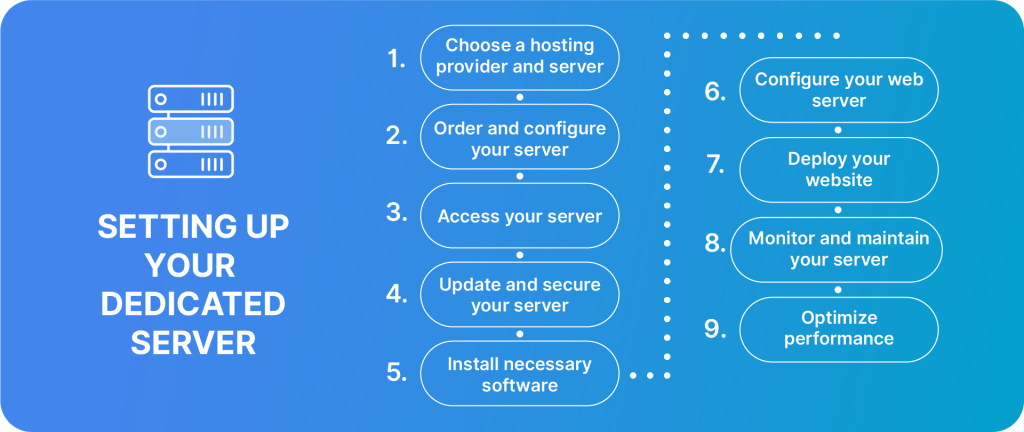
Here’s a high-level overview of the process:
1. Choose a hosting provider and server
Research various dedicated server hosting providers. Prioritize those with a solid reputation backed by positive customer feedback.
Keep in mind your hardware necessities and bandwidth requirements that cater to your website’s projected traffic and functionality. Also, don’t forget to consider extra services like managed hosting, which is a beneficial option that takes care of numerous server management duties.
2. Order and configure your server
Place an order for the chosen dedicated server package and await confirmation of server setup, which will typically include essential details.
Once your server is set up, you’ll likely receive an email with your server’s IP address, login credentials, and a link to the management interface.
3. Access your server
For Linux operating systems, employ a Secure Shell (SSH) client to safely access your server using the given credentials.
If you’re on a Windows server, the Remote Desktop Protocol (RDP) will be your go-to.
4. Update and secure your server
Start by refreshing your server’s operating system and any pre-installed software to obtain the latest security updates.
Construct a stringent firewall setup, green-lighting only essential traffic. Elevate server security even more with a formidable password policy and ponder over integrating key-based authentication for amplified safety.
5. Install the necessary software
Make a pick for your web server software. Popular contenders include Apache and Nginx.
Should your web application require a database, lean towards trusted software like MySQL or PostgreSQL.
Depending on your site’s prerequisites, integrate server-side scripting languages, such as PHP.
6. Configure your web server
Tweak your web server’s settings, keeping an eye on the document root, server blocks, and the configuration of virtual hosts.
To amp up server response durations, refine web server configurations, ensuring rapid content dispatch.
7. Deploy your website
Transfer your complete website files to your server using trusted methods. Then, activate requisite databases and port any existing data.
You’ll also need to modify your Domain Name System (DNS) configurations, pointing them towards your freshly set up server.
8. Monitor and maintain your server
Employ monitoring tools to keep an eye on server health, tracking metrics like performance, disk space, and CPU usage. Periodically scrutinize security logs, staying vigilant for any signs of malicious activity.
Additionally, implement a backup strategy to make sure you have regular snapshots of your server’s data for recovery purposes.
9. Optimize performance
Periodically assess server and website performance. Refine database queries for speed when possible and consider caching mechanisms for swift content delivery.
For challenging scenarios or advanced server configurations, don’t hesitate to seek expert guidance. Liquid Web provides 24/7/365 support so that you have access to professional assistance whenever you need it.
Overcoming common pain points with dedicated servers
Even the best technology comes with hurdles. Here’s how to tackle the most common challenges of dedicated hosting, one problem, one solution at a time.
Data migration issues
Moving large volumes of data or switching to a new server setup can lead to incompatibilities and configuration conflicts. The downtime associated with migration can disrupt business operations, leading to potential revenue loss.
The solution
- Use incremental backups so only new or changed data moves, reducing transfer time and risk.
- Rely on specialized migration tools that understand differing software versions and server configs.
- Schedule the switchover during off-peak hours and notify stakeholders in advance to minimize disruption.
Meeting privacy standards
Privacy regulations, such as GDPR and CCPA, are strict and carry heavy penalties for non-compliance. Ensuring dedicated servers meet these standards is essential to avoid fines, maintain customer trust, and safeguard the company’s reputation.
The solution
- Run regular privacy audits to pinpoint gaps in data handling, storage, and processing.
- Close those gaps with stronger encryption, tighter access controls, and clear data-retention policies.
- Train every team member on evolving privacy rules to ensure a unified, compliant workflow.
Reliance on hosting providers
Not every provider has the infrastructure or support culture to keep mission-critical servers running smoothly. The right provider will not just offer server space but will be a partner in your digital journey. They will ensure server uptime, provide necessary security updates, and be available for support when needed.
The solution
- Check each vendor’s uptime history, customer reviews, and response times before signing.
- Look for proactive security updates, 24/7 technical support, and a clear roadmap for new technologies.
- Choose partners that treat hosting as a collaboration, not just rented rack space.
Choosing the right hosting provider
As mentioned before, the foundation of any successful online venture is a robust and reliable web hosting provider. When evaluating the benefits of dedicated server hosting providers, consider:
- Reliability: An ideal hosting provider ensures that your website remains accessible and functional at all times. Frequent downtimes not only deter visitors but can also affect your search engine rankings. It’s essential to choose a provider that boasts a high uptime guarantee.
- Customer support: Technical glitches can happen, and when they do, you need to ensure you have a proficient support team ready to assist you. A hosting provider that offers round-the-clock customer support can be a lifesaver in critical situations, ensuring minimal disruption.
- Pricing: While it’s tempting to choose the cheapest option available, remember that with web hosting, you often get what you pay for. Look for a provider that offers a balance between cost and value, ensuring you’re not compromising essential features for a lower price.
Given these factors, Liquid Web stands out as a top choice for many businesses. Liquid Web, with its blend of reliability, top-notch support, and adaptable hosting solutions, offers a dedicated hosting solution that stands out in the crowded market – here’s why:
- 24/7/365 comprehensive support: Liquid Web has exceptional customer support. Their SLA includes prompt initial responses for chat requests. Day or night, when things go wrong, Liquid Web is here to help.
- Customizable, reliable, and scalable hosting solutions: Liquid Web’s hosting solutions can be tailored to fit your specific needs. You’re protected by 100% network and power uptime SLAs, round-the-clock proactive monitoring, and a guaranteed 1,000% credit for any server downtime.
- Competitive pricing: While offering top-tier services, Liquid Web remains competitively priced, ensuring you get excellent value for your investment.
When considering your next digital move, Liquid Web is certainly worth a closer look.
Making the move to a dedicated server
As you’ve read throughout this article, dedicated server hosting offers several key benefits, such as improved performance, enhanced security, unparalleled control, and unmatched reliability. You have the ability to scale your environment to suit your demand.
This hosting solution is particularly beneficial for businesses that require robust and dedicated resources to maintain their digital presence. But remember, not all hosting providers are created equal. Choosing the right provider, like Liquid Web, ensures you get the most out of these benefits.
Ready to elevate your online operations? Contact Liquid Web today and take the next transformative step for your business success!
Related Resources
Choosing Between Dedicated IP and Shared IP
Why You Need Dedicated Hosting for Your Online Store
Fully Managed Dedicated Hosting: The Only Guide You Need
An insider’s look at the 10 best WooCommerce filter plugins: Increase user experience and sales
A how-and-why guide to dedicated game server rental
Exploring the world of hybrid and multi-cloud solutions