 Todd Terwillegar
 SSL certificates come in three main types: Domain Validated (DV), Organization Validated (OV), and Extended Validation (EV). These digital sentinels are the unsung heroes of website security, working tirelessly behind the scenes to keep your data safe from prying eyes. They’re like the bouncers of the internet world, making sure only the right people get access to the VIP area (aka your sensitive information).
These digital certificates encrypt data between a user’s browser and your web server, ensuring that sensitive information remains protected. They operate on the SSL/TLS protocol, facilitating secure connections between web servers and browsers.
Technically speaking, an SSL certificate contains:
- A public key that encrypts data transmitted to the server
- A private key, held securely on the server, that decrypts the received data
- The subject (domain or organization the certificate was issued to)
- The issuer (Certificate Authority that verified and issued the certificate)
- The validity period
- A digital signature from the issuing CA
However, understanding the different types of SSL certificates is essential for choosing the right security solution for your website.
In this article, we’ll explore the six main types of SSL certificates, their use cases, and how to choose the perfect SSL certificate for your website’s security needs.
Types of SSL Certificates
Here are the six types of SSL certificates to consider:
- Extended Validation Certificates (EV SSL)
- Organization Validated Certificates (OV SSL)
- Domain Validated Certificates (DV SSL)
- Wildcard SSL Certificate
- Multi-Domain SSL Certificate (MDC)
- Unified Communications Certificate (UCC)
You might be asking yourself, “What type of SSL certificate do I need?” To pick one, let’s discuss the essential differences between them first. To pick one, first, you need to answer the following questions:
- What level of security validation does my website need?
- How many domains or subdomains do I need to secure?
- What specific purpose will the SSL certificate serve for my website?
- Should I consider a less well-known SSL certificate type?
In the upcoming section, we explore the different types of SSL certificates, organized by category to help you find the best certificate type for your website.
1. SSL Certificates by Validation Level
SSL certificates are categorized into three primary levels of validation, each offering a different degree of vetting and verification. These levels not only affect the issuance process but also influence the visual trust indicators displayed in web browsers. Let’s explore each validation level and understand how they differ in terms of security assurance and verification rigor
Extended Validation (EV) SSL Certificates
The highest-ranking and most expensive SSL certificate type is an Extended Validation Certificate.
Setting up an EV certificate requires the website owner to undergo a standardized identity verification process to confirm that they have exclusive rights to their domain.
Since EV certificates are expensive and require an extended verification process, they are used mainly by high-profile websites that require a lot of personal information from their visitors or frequently collect online payments (e.g., banks or medical providers).
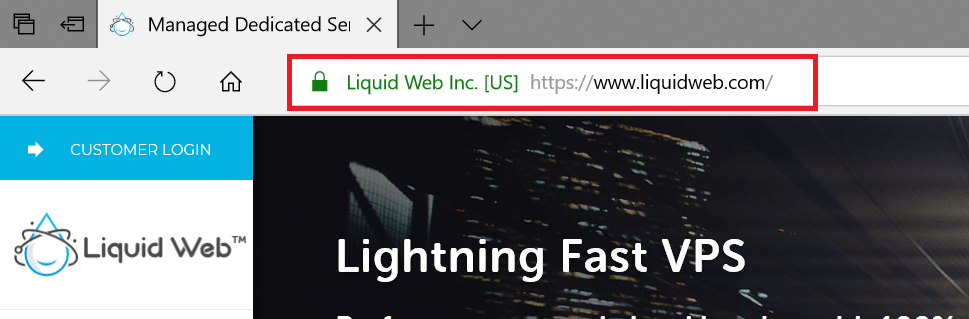
Organization Validated (OV) SSL Certificates
The Organization Validation SSL certificate’s primary purpose is to encrypt sensitive information during transactions. The OV certificate has a high assurance, similar to the EV certificate, and is also used to validate business credibility.
OV SSL certificates are the second highest in price. To obtain them, website owners need to complete a substantial validation process administered by a Certification Authority, which investigates the website owner to see if they have the right to their specific domain name.
OV certificates are often required for commercial and public-facing websites that collect and store customer information (e.g., web apps).

Domain Validated Certificates (DV SSL)
Compared to other SSLs, Domain Validation SSL certificates have low assurance and minimal encryption. Hence, the validation process to obtain this certificate type is minimal. The process only requires website owners to prove domain ownership by responding to an email or phone call.
As DV certificates are one of the least expensive and fastest types to obtain, they are often used by blogs or informational websites that don’t need to provide extra assurance to their visitors.

2. SSL Certificates by Number of Domains/Subdomains
As websites grow more complex and organizations expand their online presence, the need for flexibility in SSL coverage becomes paramount. This category of SSL certificates addresses the varying requirements for securing multiple domains or subdomains under a single certificate. From single-domain solutions to comprehensive multi-domain options, these certificates offer scalable security for diverse web infrastructures.
Single Domain SSL Certificates
Single Domain SSL Certificates secure a single fully qualified domain name (FQDN). They are the most basic and commonly used type of SSL certificate available. Single Domain SSL Certificates are available in all validation levels (DV, OV, and EV) and provide a cost-effective solution for websites with a simple structure. However, they cannot secure multiple subdomains or separate domains under the same certificate.
Single Domain SSL Certificates are ideal for small to medium-sized businesses with a single website, personal blogs or portfolio sites, and eCommerce sites operating on a single domain.
Wildcard SSL Certificates
Wildcard SSL certificates are available as both OV and DV and are used to secure a base domain and unlimited subdomains. The main benefit of purchasing a wildcard certificate is that it’s cheaper than buying several single-domain certificates.
Wildcard SSL certificates have an asterisk as part of their common name. The asterisk represents any valid subdomain that has the same base domain. For example, the common name can be *.example.com, which would allow this certificate to be installed for blog.example.com and account.example.com as well.
Customers can purchase either OV or DV Wildcard certificates when they need encryption for multiple subdomains, depending on their business needs. For example, this could be valuable for blogging solutions that create different subdomains for their user accounts.

Multi-Domain SSL Certificates (MDC)
Multi-Domain SSL certificates can secure up to 100 different domain names and subdomains using a single certificate, which can help save time and money. Businesses have control of the Subject Alternative Name (SAN) field to add, change, and delete any of the SANs as needed.
Domain Validated, Organization Validated, Extended Validated, and Wildcard certificates could be upgraded to secure multiple domains. Here are some domain name examples that can gain security with just one Multi-Domain certificate:
- www.domain.com
- www.domain.in
- www.domain.org
- domain.com
- checkout.domain.com
- mail.domain.com
- secure.exampledomain.org
- www.website.com
- www.example.co.uk
Multi-domain SSL certificates are often used by companies with representations in different jurisdictions and international conglomerates that need to secure different top-level domain names.

Multi-Domain Wildcard SSL Certificates
Multi-Domain Wildcard SSL Certificates combine the functionality of Wildcard and Multi-Domain certificates, securing multiple root domains and their subdomains under a single certificate. They offer a versatile solution for complex domain structures, using a combination of Subject Alternative Names (SANs) and wildcards in a single certificate. These certificates are typically available in OV and DV validation levels, but rarely in EV due to stricter guidelines. While they provide extensive coverage with simplified certificate management, they come at a higher price point compared to simpler certificate types.
Multi-Domain Wildcard SSL Certificates are particularly useful for large corporations with multiple brands and complex subdomain structures, educational institutions managing various departmental websites and subdomains, eCommerce platforms with multiple branded storefronts and product-specific subdomains, and web hosting providers offering SSL coverage for their clients’ diverse domain needs.
3. SSL Certificates by Specific Use Case
While standard SSL certificates cover a wide range of needs, certain specialized use cases require tailored solutions. This category focuses on SSL certificates designed for specific applications or environments, offering unique features to address particular security requirements.
Unified Communications Certificates (UCC)
Unified Communications Certificates (UCC) are specialized Multi-Domain SSL certificates initially designed for Microsoft Exchange and Office Communications environments. UCCs can secure multiple domain names under a single certificate, similar to SAN certificates. They support multiple domain names and are compatible with Microsoft Exchange and Office Communications servers. UCCs are available as EV SSL certificates for maximum trust and can typically secure up to 100 different domain names.
UCCs are primarily used for Microsoft Exchange environments, Office 365 implementations, and unified communications systems integrating various collaboration tools. They are ideal for businesses using Microsoft communication products and those requiring a single certificate to secure multiple domains in a collaborative environment.

Unified Communications Certificates (UCC)
Unified Communications Certificates (UCC) are specialized Multi-Domain SSL certificates initially designed for Microsoft Exchange and Office Communications environments. UCCs can secure multiple domain names under a single certificate, similar to SAN certificates. They support multiple domain names and are compatible with Microsoft Exchange and Office Communications servers. UCCs are available as EV SSL certificates for maximum trust and can typically secure up to 100 different domain names.
UCCs are primarily used for Microsoft Exchange environments, Office 365 implementations, and unified communications systems integrating various collaboration tools. They are ideal for businesses using Microsoft communication products and those requiring a single certificate to secure multiple domains in a collaborative environment.
Subject Alternative Name (SAN) Certificates
Subject Alternative Name (SAN) Certificates allow multiple domain names to be secured using a single certificate. SAN certificates, also known as Multi-Domain SSL Certificates, can secure up to 100 different domain names. They are available in DV, OV, and EV validation levels, offering flexibility for businesses with multiple branded websites or domains. SAN certificates simplify certificate management and can be more cost-effective than purchasing individual certificates for each domain.
SAN Certificates are ideal for businesses managing multiple related domains, companies with various regional or country-specific websites, and organizations looking to secure both their main domain and associated subdomains under a single certificate.
Code Signing Certificates
Code Signing Certificates are used to digitally sign software, scripts, or executable files to verify the authenticity of the software publisher. These certificates ensure that the code hasn’t been tampered with since it was signed. When users download signed software, they can verify its origin and integrity, which helps prevent warning messages and builds trust. Code Signing Certificates are available for both individuals and organizations.
Code Signing Certificates are essential for software developers, app creators, and organizations distributing executable files, drivers, or scripts to end-users. They are particularly important for open-source projects and commercial software products to establish credibility and ensure
Email/Client Authentication Certificates
Email/Client Authentication Certificates, also known as S/MIME certificates, are used to encrypt email communications and digitally sign emails. These certificates provide both privacy and authentication for email exchanges. They encrypt email content and attachments, allow recipients to verify the sender’s identity, and prevent email tampering and phishing attempts. S/MIME certificates can be issued to individuals or for organizational use.
Email/Client Authentication Certificates are crucial for businesses handling sensitive information via email, legal and financial institutions requiring secure communications, healthcare providers ensuring HIPAA compliance, and individuals seeking to protect their personal email correspondence.
4. Other Types of SSL Certificates
Beyond the standard commercial SSL certificates, there are other types that serve specific needs or offer alternative approaches to web security. These options cater to unique situations, from internal testing environments to open-source initiatives for widespread SSL adoption.
Self-Signed SSL Certificates
Self-Signed SSL Certificates are created and signed by the website owner rather than a trusted Certificate Authority. While they provide encryption, they don’t offer the same level of trust as CA-signed certificates. Self-signed certificates are free to create but are not recognized as trusted by web browsers, triggering security warnings for visitors. They offer the same encryption capabilities as CA-issued certificates but lack third-party validation.
Self-Signed SSL Certificates are primarily used for internal testing or development environments, intranet websites, and personal projects where public trust is not required. They are not suitable for production websites or any public-facing applications.
Let’s Encrypt SSL Certificates
Let’s Encrypt SSL Certificates are free, automated, and open certificates provided by the Internet Security Research Group (ISRG). These certificates offer an accessible way for website owners to implement SSL/TLS encryption. Let’s Encrypt certificates are domain validated (DV) only and have a short validity period of 90 days, but they can be automatically renewed. They are widely supported by web hosting providers and server software, making SSL implementation more accessible to a broader range of website owners.
Let’s Encrypt SSL Certificates are ideal for small to medium-sized websites, blogs, personal projects, and any web application that requires basic encryption. They are particularly useful for developers and organizations looking to secure multiple domains or subdomains without incurring additional costs.
How to Choose an SSL Certificate
As we’ve seen, each certificate type has its own specific use case. The keys to picking the proper SSL certificate for your business are the number of domains you want to certify and the level of security.
If you feel your business will only need certification for only one or two domains, then single-name and wildcard certificates might be the choice for you. On the other hand, if you know your business needs multiple domains to operate, you’ll need a multi-domain certificate.
The other aspect to consider is if your industry raises security concerns. If you’re in a business sector like finance, medical, or government, your website could be handling sensitive user information countless times a day. If this sounds like you, you should consider an EV or OV certificate.
Reviewing Your SSL Certificate
The review process for your SSL certificate is straightforward, but it’s essential for reaping the security benefits that all the SSL certificate types provide. An SSL review consists of the following steps:
- Once you’ve purchased and configured your certificate, check to ensure the URLs of your web pages start with HTTPS. The S is the indication that SSL now secures your site.
- You’ll also notice a gray padlock icon next to your URL. Click that icon, and you can review all the details of your SSL certificate.
The easiest way to ensure your SSL certificate is set up, valid, and trusted is to use Liquid Web’s free SSL verification tool.
Essential SSL Takeaways
Reviewing all SSL certificate types is critical to ensuring you have the right SSL certificate securing your website. It’s a crucial step toward maintaining trust with your visitors and customers. After all, there’s nothing as important in the digital world as keeping private information safe and secure.
Here are three key SSL takeaways to remember:
And if you need to buy an SSL certificate, we offer those, too.
- If a website has HTTP instead of HTTPS, the browser sends all the information as plain text to the web server. Anyone watching that web traffic can see that information.
- If the website has an SSL certificate installed and is using HTTPS, the web traffic is encrypted. Encryption is of great importance for protecting any customer’s sensitive information.
- Lastly, Google incentivizes websites with installed SSL certificates by ranking them higher in its organic search results.
Now that you’re well acquainted with the different types of SSL certificates, keeping your site secure is probably top of mind.
At Liquid Web, we know the importance of a secure website. That’s why we include essentials like DDoS protection and a 24/7/365 dedicated team ensuring you’re clear of security threats in our hosting plans.
Check out our Liquid Web hosting plans to get started today.